
Introducing ExpertWind Insights V2
2026-09-16 · News
By ExpertWind Team
One year after launching ExpertWind Insights, we are introducing its first major evolution.
ExpertWind Insights V2 goes beyond adding more diagnostics or individual features. It expands what Insights can understand about a wind farm, the information it can bring into the assessment, how teams can work with performance intelligence and where that intelligence can be used.
Three major new product pillars are at the centre of this release:
- Wind Resource, connecting historical resource conditions, turbine-level inflow, wake effects, expected energy and actual production
- Copilot Workspace, creating a complete environment for engineering investigation, review and operational follow-up
- Connect API, bringing ExpertWind performance intelligence into external systems, reporting and workflows
Together, they extend Insights across a much larger part of wind farm improvement, from separating resource from performance to investigating the evidence, deciding what matters and carrying improvements through to follow-up and validation.
Wind Resource: separate resource from performance
The new Wind Resource module brings the available wind resource directly into the performance assessment.
Changes in production can come from the wind itself, wake effects, external conditions, operational losses or turbine performance. V2 adds the context needed to separate these effects and understand what actually drove the energy yield.
Insights connects historical wind conditions, turbine-level inflow, wake effects, expected and actual production to analyse how the wind available to each turbine translates into energy output.
This unlocks a resource-based energy assessment: how much energy the available wind could support, how wake effects change that potential, what was actually produced and which losses explain the difference.
Applied month by month, this makes it possible to understand why a given period performed differently from its baseline and how much of that difference came from resource conditions, wake effects, operational losses or asset performance.
Wake losses are also quantified using both modelled and observed wind and power deficits, showing how much of the free-flow potential is lost to wake effects.
This complements the existing Energy Yield and Turbine Performance analysis with a new starting point: the wind resource that actually affected each turbine.
The result is a much stronger connection between the wind available to the farm, the energy that should have been produced and the performance actually achieved.
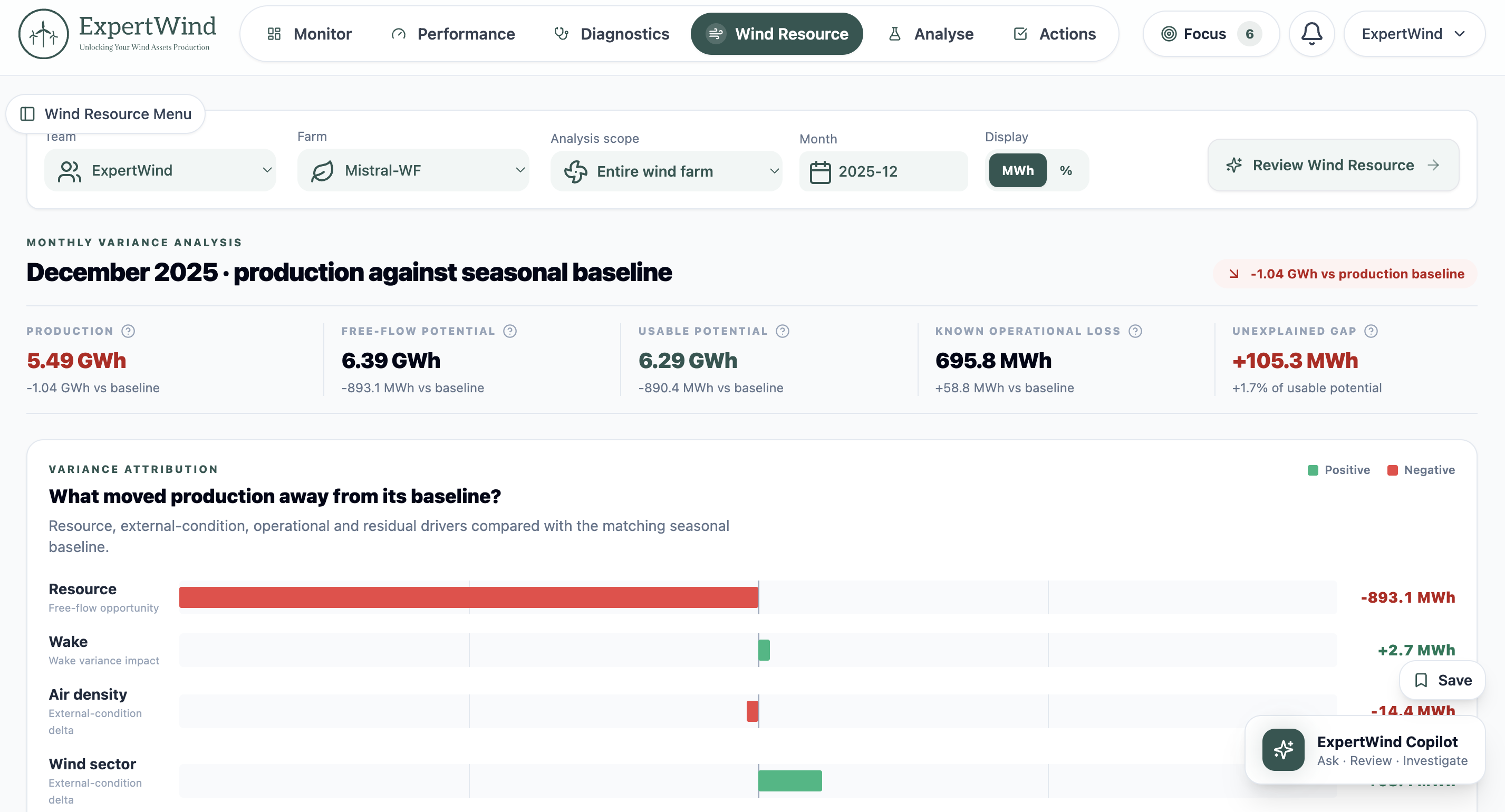 Fig. 1: Wind Resource connects historical conditions, turbine-level inflow, wake effects, expected energy and actual production in a single module.
Copilot Workspace: work directly with performance intelligence
With V2, ExpertWind Copilot becomes a much broader performance workspace.
Copilot identifies the priorities that deserve attention first, then helps users investigate results, review the evidence, ask questions, build engineering conclusions and decide what to do next, with the relevant context kept together throughout the review.
Reviews are persistent, so questions, evidence, conclusions and outputs remain together as the work develops.
Workspace also connects directly into follow-up. Copilot advises on the creation of Actions from a review, helps assess detected Issues, supports decisions on when Actions can be closed and defines clear checklists for corrective work.
The result is a much more complete way of working with Insights.
Teams can use Copilot as the main entry point into their performance work when they want to, or use it alongside the broader Insights interface to investigate specific questions and manage follow-up.
This is a major step beyond the original Copilot experience. Instead of supporting individual results, Copilot can now help carry the work from understanding a problem through to deciding and managing the next action.
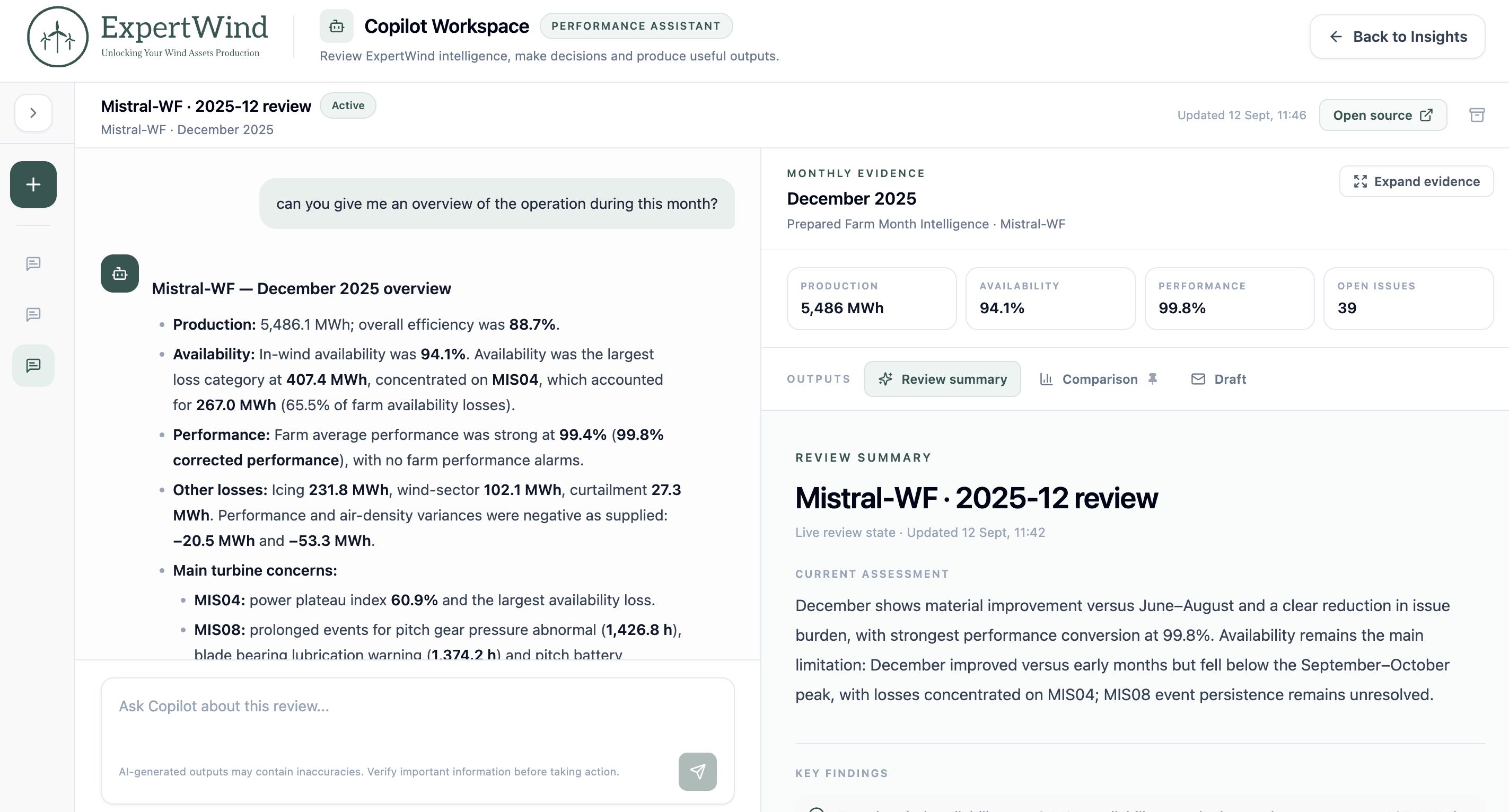 Fig. 2: Copilot Workspace keeps engineering reviews, evidence, conclusions and operational follow-up together in a persistent environment.
Connect API: bring Insights into your systems
V2 also introduces the Connect API, extending ExpertWind performance intelligence beyond the Insights interface.
Connect API v1 provides secure, structured read-only access to Insights data and results for use in external applications, internal reporting and existing customer workflows.
This includes assets, Issues, Actions, monthly KPIs, diagnostic results, turbine logs and selected timeseries outputs.
Teams can create credentials for all farms or a selected subset of assets, with dedicated documentation covering authentication, access rules, quick-start workflows and endpoint references.
Connect API allows ExpertWind intelligence to become part of the systems and reporting environments teams already use, rather than remaining confined to the Insights interface.
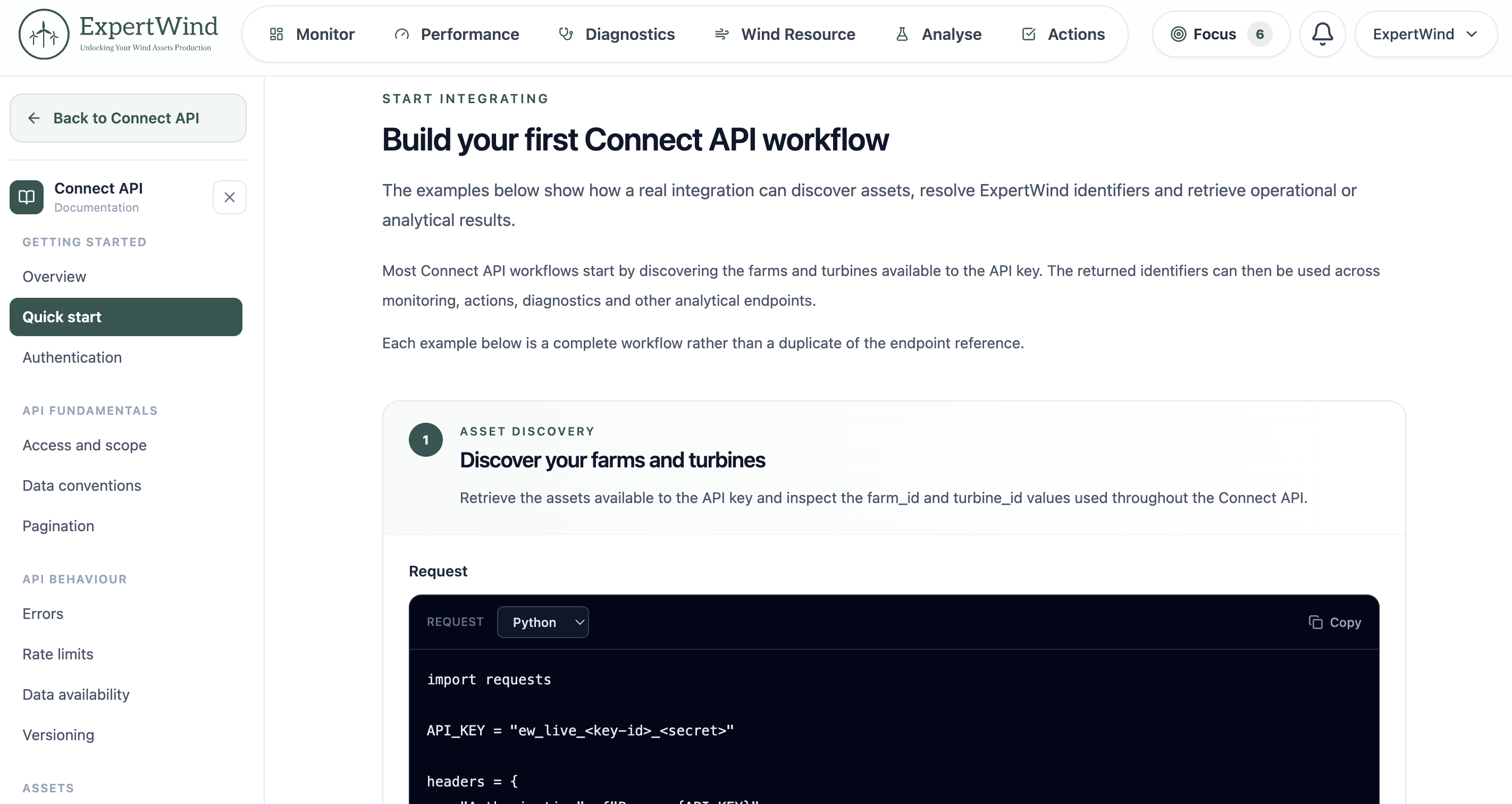 Fig. 3: Connect API provides structured access to Insights results and workflows for integration with external applications and reporting systems.
Beyond the three pillars
The three new pillars are integrated into the wider Insights workflow rather than operating as separate features.
Wind Resource results feed directly into monitoring, reporting, Issues and Actions. Copilot can work with those results in context, while Connect API makes the same intelligence available to external systems.
Wind Resource data also strengthens existing diagnostics. Calibrated external references can improve assessments such as Wind Speed Coherence and North Deviation by adding an independent reference for turbine-level wind speed and direction.
Security has also been strengthened across the platform, with multi-factor authentication for user accounts, additional verification for sensitive Connect API key actions and a new Audit Trail providing visibility into important account, workspace and security activity.
The navigation has also been reorganised around Monitor, Wind Resource, Performance, Diagnostics, Analyse and Actions, bringing the main stages of performance work into a clearer structure.
The analytical scope now connects:
Wind Resource → Energy Yield → Turbine Performance → Diagnostics → Turbine Logs
And those results feed the wider workflow:
Data → Assessment → Findings → Priorities → Actions → Follow-up → Validation
What V2 changes
Wind farm performance work does not end when a dashboard shows that something changed. That is often where the real work starts.
Teams need to understand why production changed, separate resource effects from asset performance, assess the evidence, decide what deserves attention, define the right action and verify whether the improvement was delivered.
ExpertWind Insights is built around that complete process, rather than the dashboard alone.
V2 brings together resource intelligence, performance assessment, engineering evidence, Copilot-supported investigation, Issues, Actions, monitoring, reporting, follow-up, validation and external integration in one connected environment.
It is a significant step towards the product we have been building from the start: a performance environment that does more than show what happened. It helps wind asset teams understand what matters, decide what to do next and carry that work through to measurable improvement.
Ready to explore ExpertWind Insights? Schedule a demo and we’ll walk you through the new capabilities.
You can also visit ExpertWind Insights to explore the complete performance workflow, or learn more about Insights Campaigns if you want to start with a focused wind farm assessment.
We will also be showcasing ExpertWind Insights V2 in person at WindEnergy Hamburg 2026, 22–25 September. Meet us there.